
Multi-level Source maps
Source maps are awesome but one issue is that compiling from x-lang to JavaScript is a single level of mapping, if you want to go from x-lang > JavaScript > minified JavaScript you couldn’t as closure compiler, currently, only has a single level of mapping, until now. UglifyJS2 allows you to specify an input source map from the first stage of compilation, enabling multi-level mapping.
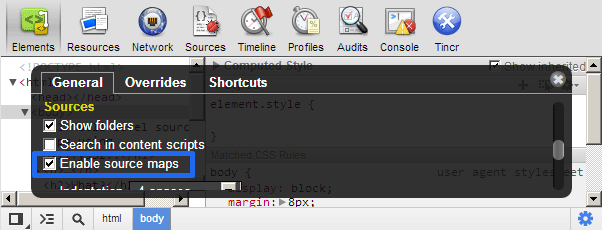
Check out the following demonstration showing multi-level source maps for TypeScript and Coffeescript. If you haven’t enabled source maps you can do so in Chrome and WebKit Nightly by opening the dev tools > clicking the cog in the lower right corner > general > enable source maps.
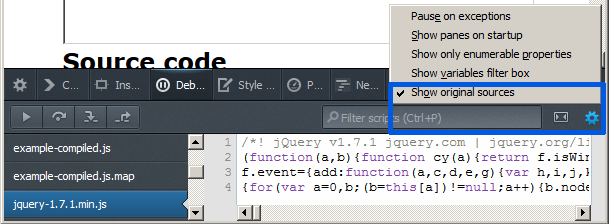
In Firefox 23+ you can enable it in the build-in dev tools by going to Debugger > then clicking the cog in the top right corner > Show original sources.
Multi-level Source maps demo Download the source files
Multi-level what?
Now in code, let’s say CoffeeScript(CS), you can compile to JavaScript and generate a source map using the new redux compiler. You take that generated source map and at the minifying stage, with UglifyJS2, specify --in-source-map option to reference the first level source map, CS > JS, this will map the minified JavaScript directly back to the CS and not the compiled JavaScript output!
This sounds like a lot of work but if you have a build process involved it’s a matter of kicking of a simple cli command to do the work for you and it gives you the kick-arse ability of having the multi-level mappings.
Here are a few snippets on how you can get this going in CoffeeScript or TypeScript. For more info on source map generation check out the TypeScript and CoffeeScript blog posts.
CoffeeScript
$> coffee --js -i test.coffee
$> coffee --source-map -i test.coffee > test.js.map
The first line will compile your CoffeeScript to JS the second line will then generate the source map file.
$> uglifyjs2 test.js
   -o test.min.js
   --source-map test.min.js.map
   --in-source-map test.js.map
   -m -c
Uglify has a few more options the most important being the --in-source-map which will reference that source map when taking into account the file information and what it’ll output for the second stage source map.
TypeScript
$> tsc greeter.ts -sourcemapThe TypeScript compiler outputs greeter.js and greeter.js.map
$> uglifyjs2 greeter.js
   -o greeter.min.js
   --source-map greeter.min.js.map
   --in-source-map greeter.js.map
   -m -c
This command is exactly the same as the CoffeeScript example but with the file names changed.
This will work for any other language that compiles to JavaScript that can generate a source map. Check out the source maps wiki for more info.
Source maps works in Chrome, Safari 6.1+, WebKit Nightly, Firefox 23+.